A wallet, not a bank
Top up, pay by QR, mobile, alias or card, and see every payment as it happens.
OMPAY is authorised by the Central Bank of Oman as a Fintech Payment Service Provider and backed by Omantel.





Get started
Ready in minutes
Download the app
Get OMPAY from the App Store, Google Play or AppGallery.
Verify your ID
Follow the onboarding steps and verify your identity with a valid ID.
Start using your wallet
Within minutes your wallet is ready to top up, pay and send money.

Top up
Top up from your bank or card
- Top up by bank transfer from your bank account
- To top up by card, start by adding a debit card.
- Your wallet holds up to OMR 1,000.000
Any fees are shown in the app.

Pay
Four ways to pay
- QR: scan the shop’s code and confirm
- Mobile number: pay someone with just their number
- Alias: pay to someone’s unique name instead of a number
- Card: your connected Visa card, in shops, online and abroad


OMTRACK
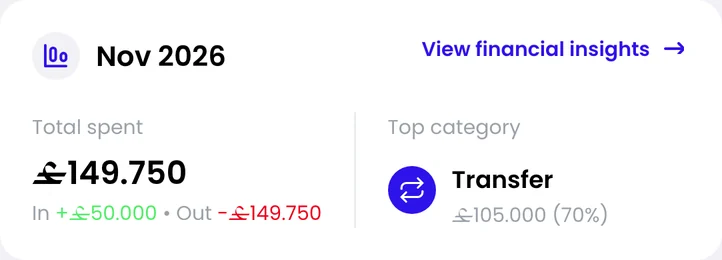
Your month at a glance
- Every payment and transfer listed as it happens
- See the month’s total spent and top category in Activity
- Set budgets and goals with OMTRACK

Limits, fees and who can join
| Item | OMPAY wallet |
|---|---|
| Maximum balance | OMR 1,000.000 |
| Spending and transfer limits | They vary by activity and are shown in the app. |
| Fees | Any fees, such as for transfers abroad or card use, are shown in the app. |
| Who can join | Omani citizens and residents of Oman with a valid ID |
| Bank account | Not needed |
| Available on | iOS, Android and Huawei AppGallery |
Questions about the wallet
How do I get started?
Download the OMPAY app, follow the onboarding steps and verify your identity with a valid ID. Your wallet is ready within minutes.
Who can use OMPAY?
Omani citizens and residents of Oman with a valid ID. The app is on the App Store, Google Play and Huawei AppGallery.
Do I need a bank account?
No. OMPAY works on its own, so you can hold, pay and send money without a bank account. It is a wallet, not a bank: it does not offer loans or savings accounts.
How do I top up my wallet?
In the app, by bank transfer or by debit card. To top up by card, add the card first; you can save it for next time.
What are the limits and fees?
Your wallet can hold up to OMR 1,000.000. Spending and transfer limits vary by activity and are shown in the app. Any fees, such as for transfers abroad or card use, are shown in the app.
Is OMPAY secure?
Global Financial Technology LLC (OMPAY) is authorised by the Central Bank of Oman as a Fintech Payment Service Provider. It holds ISO/IEC 27001:2022 certification for information security. If something looks wrong, call customer care on +968 2444 2679, 24/7.
Point your phone’s camera at the code to get the app.
App Store, Google Play and AppGallery are trademarks of their owners.
Authorised, secure and backed by Omantel
- Central Bank of OmanGlobal Financial Technology LLC (OMPAY) is authorised by the Central Bank of Oman as a Fintech Payment Service Provider.
- OmantelOMPAY operates under Global Financial Technology LLC, a company backed by Omantel.
- ISO/IEC 27001:2022 certified
- PCI DSS compliant
- Customer care, 24/7+968 2444 2679